
Miniatures of the sheets you have added are presented at the bottom of the paper view. Features for adding, removing, load and save sheet are also found here.
Click the miniature that you wish to edit, the miniature then turns green (see figure 1). You can change the order the sheets are displayed in by clicking one sheet and then drag it to desired position in the line with the mouse pointer.
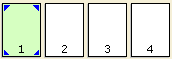
Figure 1
Besides changing the order of existing sheets you also have the following options:
|
Figure 2
|
Figure 3 |
|
||
|
Figure 4 |
Figure 5 |
|
||
|
Figure 6 |
Figure 7
|
|
||
|
Figure 8 |
Figure 9 |
|
|
Note:
|


